


Product Updates: Free Plan, Tasks, and Containers
Hot Dev is on fire with our latest update, which brings a free Hot Cloud plan, long-running compute tasks, containers, and packages for FFmpeg, Playwright, Whisper, and more. Here's what's new.
Free Plan
The Hot CLI and runtime are open source under Apache 2.0. Now you can experience Hot Cloud for free, too. The Free plan includes 5,000 runs per month, 5,000 Compute Unit Seconds for containers, 1 GB of file storage, and access to all features including Tasks, Hot Box, and every package in the registry. Get started for free.
Tasks
Hot functions execute as Runs — lightweight and fast, ideal for event handlers, API endpoints, and scheduled jobs. Tasks are the long-running counterpart: compute processes that can run for minutes or hours, exchange messages, and save progress.
There are two types:
- Code Tasks — Long-running Hot functions with messaging, WebSocket support, and checkpointing
- Container Tasks — OCI containers via Hot Box
Task Creation
Use ::hot::task/start to launch any Hot function as a background task. It returns immediately — the work happens asynchronously on the task worker:
::task ::hot::task

info ::task/start(::myapp/process-data, {url: "https://example.com"}, {
  timeout: 3600000,
  retry: {attempts: 5, delay: 2000, backoff: "exponential"}
})
info.id  // task UUID — use to check status, send messages, or cancel
Code tasks also support messaging (send/receive between tasks and runs), checkpointing (save and restore progress across retries), and WebSocket connections for long-lived real-time integrations.
Dashboard
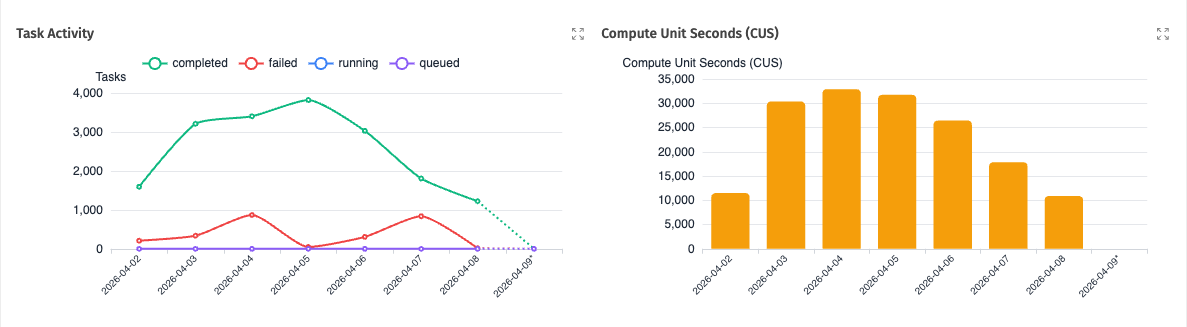
Tasks are visible in the Hot App alongside your runs and events:
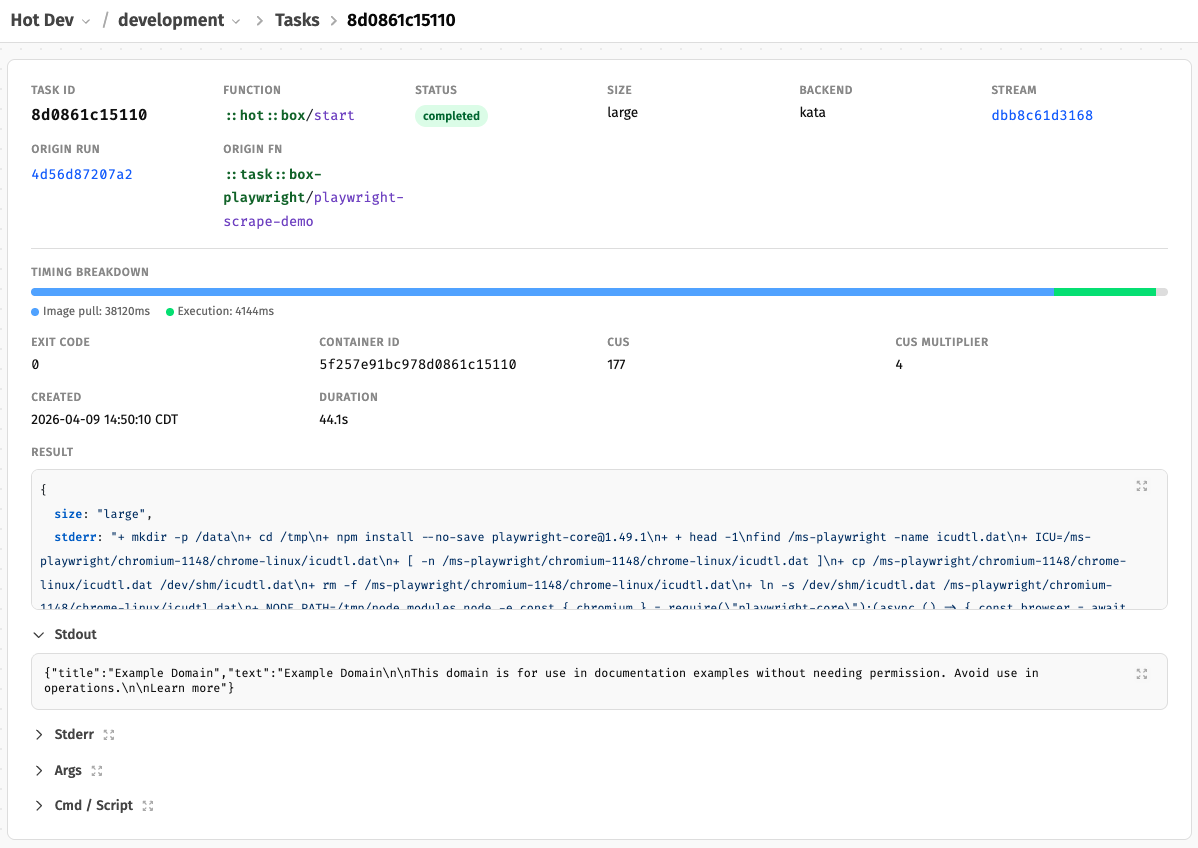
Drill into any task for the full detail — timing breakdown, stdout/stderr, container info, and retry history:
See the Tasks docs for full details on the task lifecycle and API.
Containers (Hot Box)
Hot Box lets you run any Docker/OCI container image from Hot code. If there's a tool that runs in a container, you can run it on Hot.
::box ::hot::box

task ::box/start(::box/BoxConf({
  image: "python:3.13-alpine",
  cmd: ["python", "-c", "print('Hello from Hot Box')"],
  size: "nano"
}))
Use script for multi-line shell commands, cmd for single executables. Containers run in isolation with all Linux capabilities dropped and a read-only root filesystem by default. Network access is opt-in (network: "internet"), and writable: true enables package installation.
For local development, Hot uses Docker to run containers — giving you the same container experience locally as on Hot Cloud. Just have Docker running and hot dev handles the rest.
The hotbox Utility
Every container ships with a hotbox CLI that bridges the container filesystem and Hot's hot:// file storage:
hotbox cp hot://uploads/input.csv /data/input.csv   # download from storage
hotbox cp /data/output.csv hot://results/output.csv  # upload to storage
hotbox ls hot://results/                             # list files in storage
hotbox info                                          # task metadata
Your container processes local files; hotbox handles transfer to and from hot:// storage.
Storage and Billing
Files written to hot:// live in your account's file storage. Every plan includes storage — from 1 GB on Free up to 100 GB on Scale. Containers come in size presets from nano (64 MB) to 4xlarge (8 GB, 100% CPU) and are billed by Compute Unit Seconds (CUS) — wall-clock time multiplied by a size multiplier. Every plan includes CUS, from 5,000/month on Free to 5,000,000/month on Scale. See the pricing page for the full breakdown and Container Billing for size details.
See the Containers docs for the full API, security model, and file access details.
Hot Box Packages
We've created packages for some of the most popular CLI tools, built on Hot Box. Each one handles container setup, file I/O, and result parsing — you just call a function.
| Package | Description |
|---|---|
| ffmpeg | Video/audio processing — probe, transcode, thumbnails, extract audio |
| imagemagick | Image processing — identify, resize, convert, optimize |
| libreoffice | Document conversion — DOCX, XLSX, PPTX to PDF and more |
| pandoc | Document conversion — Markdown, HTML, LaTeX, DOCX, EPUB, and 40+ formats |
| playwright | Headless Chromium — screenshots, PDF rendering, page scraping |
| sox | Audio processing — info, convert, normalize, trim, effects |
| tesseract | OCR — extract text from images (txt, hOCR, TSV, PDF output) |
| whisper | Speech-to-text — transcribe and translate audio with OpenAI Whisper |
Every package provides both sync and async APIs. Sync functions (e.g., ::ffmpeg/probe) run the container and return the result. Async variants (e.g., ::ffmpeg/start-probe) return a TaskInfo immediately for use with ::task/await, enabling parallel container execution.
FFmpeg
Probe media files, extract thumbnails, transcode, and rip audio tracks:
info ::ffmpeg/probe("hot://uploads/video.mp4")
info.format.duration  // "120.500000"

thumb ::ffmpeg/thumbnail("hot://uploads/video.mp4", {
  time: "00:00:10",
  width: 320,
  format: "png"
})
thumb.url  // "hot://ffmpeg/<uuid>/thumbnail.png"

out ::ffmpeg/transcode("hot://uploads/video.mov", {
  format: "mp4",
  codec: "libx264",
  crf: 23
})
Playwright
Take screenshots, render PDFs, and scrape page content with headless Chromium:
shot ::playwright/screenshot("https://example.com", {
  full-page: true,
  format: "jpeg",
  quality: 85
})
shot.url  // "hot://playwright/<uuid>/screenshot.jpg"

page ::playwright/scrape("https://example.com")
page.title  // "Example Domain"
page.text   // visible page text
Whisper
Transcribe audio to text with OpenAI Whisper — supports multiple models and languages:
out ::whisper/transcribe("hot://uploads/recording.mp3", {
  model: "small",
  language: "en"
})
out.text      // "Hello, this is a transcription..."
out.segments  // [{start: 0.0, end: 2.5, text: "Hello..."}, ...]
out.url       // "hot://whisper/<uuid>/transcript.json"
Tesseract OCR
Extract text from scanned documents and images:
result ::tesseract/ocr("hot://uploads/scan.png")
result.text  // extracted text content
result.url   // "hot://tesseract/<uuid>/output.txt"
Composing Packages
Because every package reads from and writes to hot:// storage, they compose naturally. Extract audio from a video and transcribe it:
audio ::ffmpeg/extract-audio("hot://uploads/interview.mp4", {
  format: "wav",
  sample-rate: 16000,
  channels: 1
})
transcript ::whisper/transcribe(audio.url, {model: "small", language: "en"})
transcript.text
Run containers in parallel with the async start-* APIs:
::task ::hot::task

data parallel {
  shot ::playwright/start-screenshot("https://example.com")
  pdf ::playwright/start-pdf("https://example.com", {format: "Letter"})
}

results parallel {
  shot-result ::task/await(data.shot.id)
  pdf-result ::task/await(data.pdf.id)
}
All packages include full API docs, types, and usage examples at their package pages on hot.dev/pkg.
Get Started
Everything above is live now. Sign up for free or download Hot Dev to develop locally.
Follow @hotdotdev on X or subscribe to Hot Takes for what's next.