


Product Updates: MCP, Domains, Webhooks, and More
I've been busy since launching in January. The highlight is MCP Services — combined with Custom Domains and Service Keys, you can now offer MCP tools to your own customers on your own domain. But there's a lot more. Here's what's new.
MCP Services
MCP (Model Context Protocol) lets AI models and agents discover and invoke tools. With Hot Dev, any function becomes an MCP tool — add mcp metadata and deploy:
get-forecast
meta {mcp: {service: "weather"}}
fn (location: Str): Vec {
  loc ::uri/encode(location)
  response ::http/get(`https://wttr.in/${loc}?format=j1`)
  response.body.weather
}
Hot auto-generates JSON schemas from your type signatures and serves them via a standards-compliant MCP endpoint. Claude, Cursor, or any MCP client can connect and start calling tools immediately. Both Streamable HTTP and HTTP+SSE (legacy) transports are supported, with streaming for long-running calls.
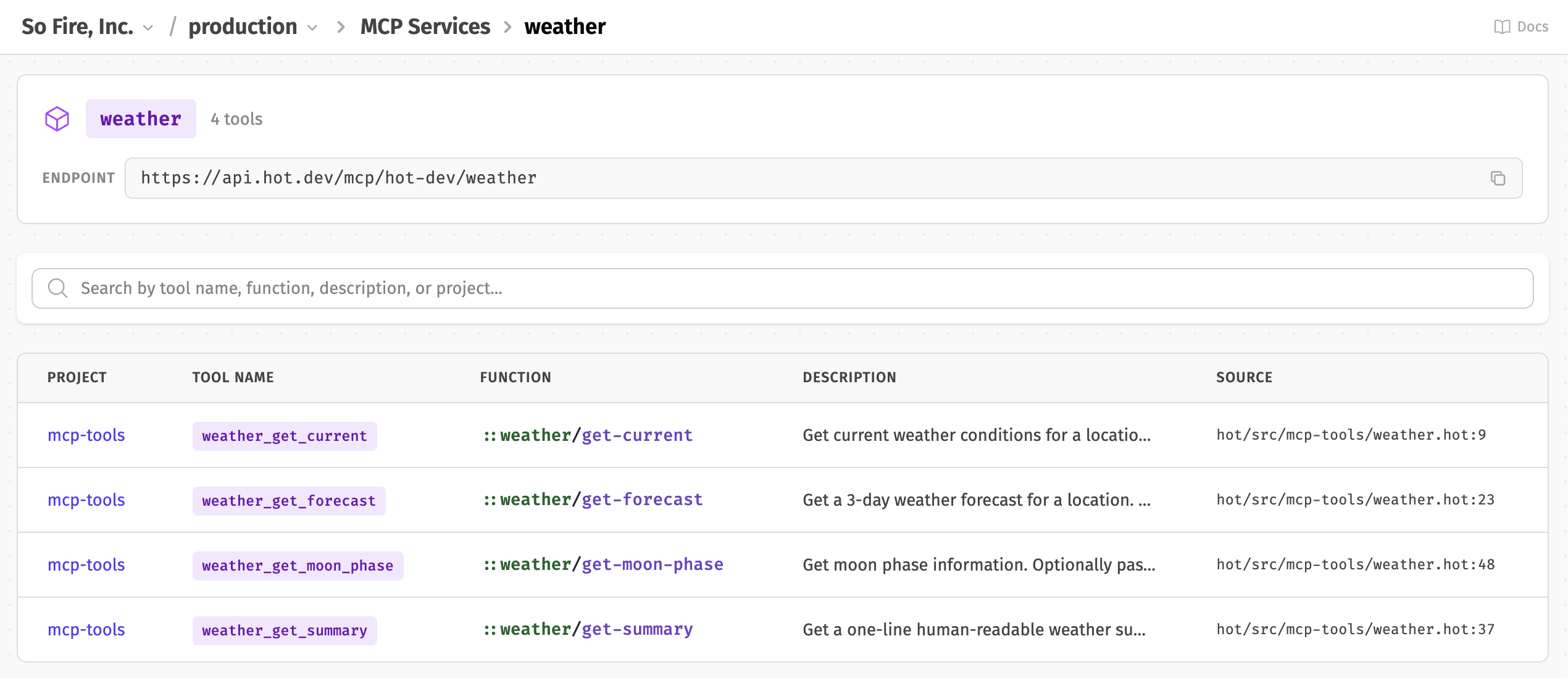
See the MCP Services docs for details on schemas, annotations, and multi-service configuration.
Custom Domains
Map your own domain to Hot Dev — mcp.yoursaas.com instead of api.hot.dev. Enter the domain in the Hot App, add two DNS records, and Hot handles TLS provisioning and CloudFront distribution automatically. The detail page updates in real-time as each step completes.
Once active, the domain routes to the full API surface. All existing API keys, MCP services, and webhooks work without any configuration changes.
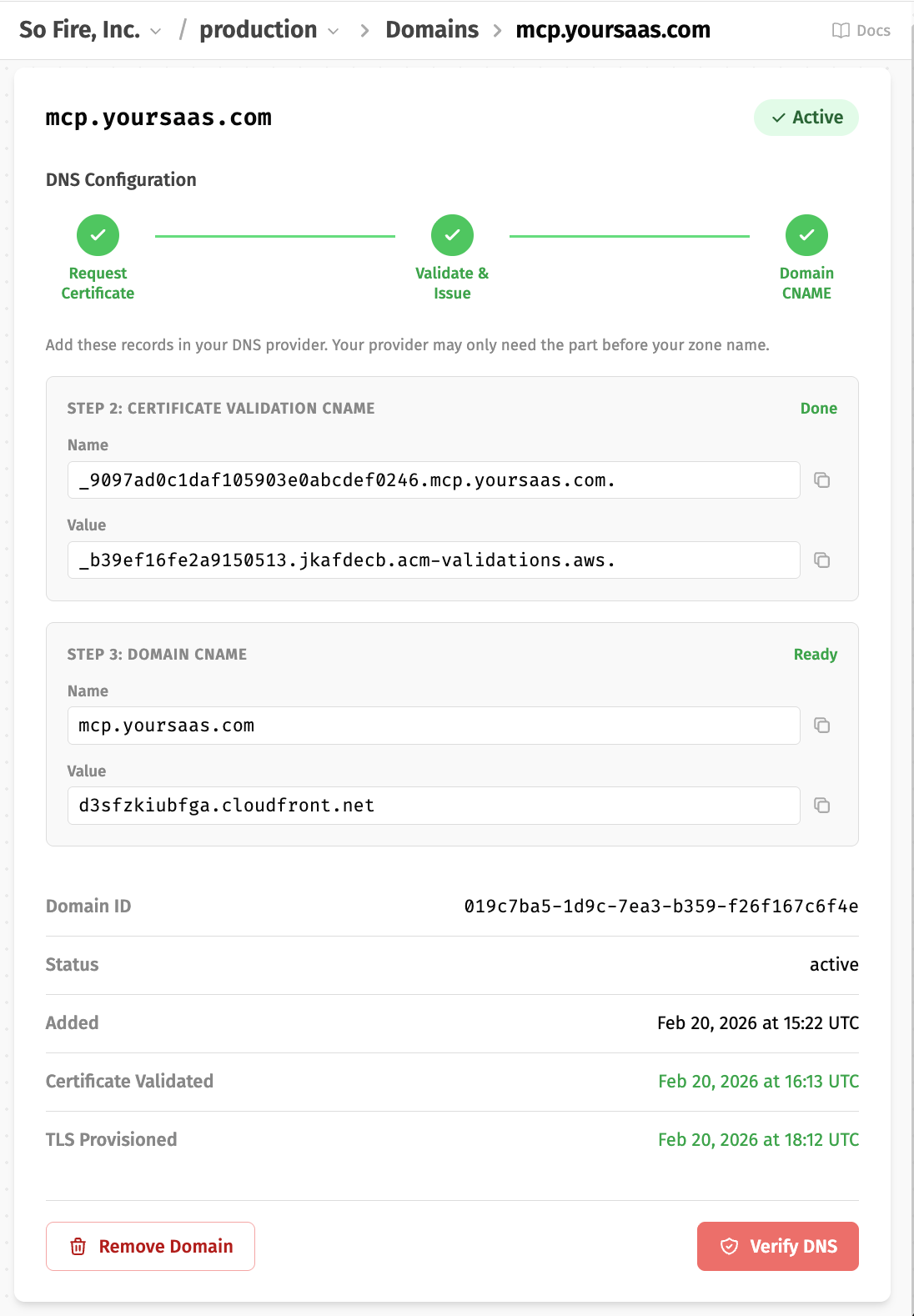
Available on Pro and Scale plans. See the Custom Domains docs for the full setup guide.
Service Keys
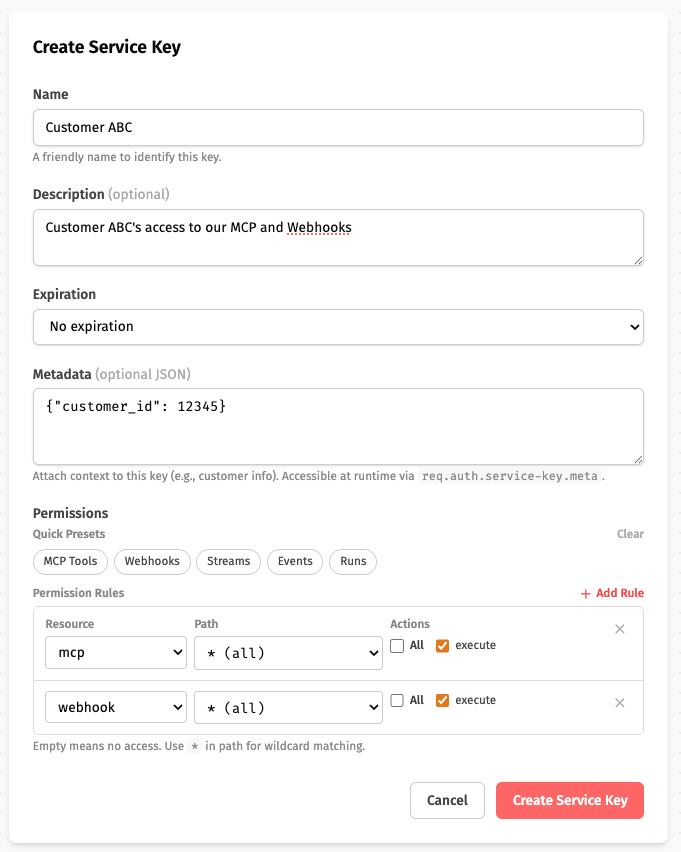
Service Keys are long-lived, permission-scoped credentials for your customers. Issue narrowly scoped tokens that grant access to specific MCP tools, streams, or webhooks.
The key feature is customer metadata. Attach JSON to a service key (e.g., {"customer_id": "acme-123", "plan": "enterprise"}), and it's automatically available to your functions at runtime:
get-usage
meta {mcp: {service: "billing", description: "Get usage for the calling customer"}}
fn (): Map {
  req ::ctx/get("hot.request")
  customer-id req.auth.service-key.meta.customer_id
  fetch-usage-for(customer-id)
}
Each customer's key carries their identity — no extra parameters needed. Tokens have no hot_ prefix, making them suitable for white-label integrations. Available on Pro and Scale plans.
Public & Pass-Through Auth for MCP
Not every tool needs Hot credentials. Set auth: "none" to make individual tools publicly accessible — useful for open utilities or BYOK (bring your own key) or pass-through auth patterns where your customers provide their own API keys for third-party services.
list-invoices
meta {
  mcp: {
    service: "billing",
    auth: "none",
    description: "List invoices for the authenticated customer"
  }
}
fn (status: Str?, limit: Int?): Vec {
  req ::ctx/get("hot.request")
  api-key req.headers.authorization
  if(is-null(api-key), fail("Authorization header required"))

  qs ::uri/encode-query({
    status: or(status, "all"),
    limit: or(limit, 25)
  })

  ::http/get(`https://api.yoursaas.com/v1/invoices?${qs}`, {
    headers: {authorization: api-key}
  }).body.invoices
}
Your customers pass their existing api.yoursaas.com credentials through the MCP tool — no Hot API Key or Service Key needed. The full HTTP request context (headers, method, URL, query params, caller IP) is available via hot.request for all MCP invocations. Public and authenticated tools can coexist in the same service; auth is per-tool, not per-service. See the MCP auth docs for details.
The Full Picture: MCP for Your SaaS
MCP Services + Custom Domains + Service Keys = a complete solution:
- Define tools — Hot functions with
mcpmetadata - Issue credentials — Service keys with scoped permissions and customer metadata
- Brand the endpoint —
mcp.yoursaas.comvia Custom Domains - Customers connect — AI agents discover tools via
tools/listand start calling them
Your functions identify the caller, enforce limits, and scope data — all from the service key metadata. No auth middleware, no token validation. Hot handles it.
Webhooks
Webhooks let external services — Slack, Stripe, GitHub — send HTTP requests directly to your Hot functions. Add webhook metadata, deploy, and you get a public URL:
on-stripe-payment
meta {
  webhook: {
    service: "stripe",
    path: "/payment",
    method: "POST",
    description: "Handle Stripe payment webhook events"
  }
}
fn (request: HttpRequest): HttpResponse {
  event from-json(request.body-raw)
  process-payment(event)
  HttpResponse({status: 200, body: {received: true}})
}
Supports optional API key auth for internal webhooks, provider signature verification, and the async send() pattern for deferring heavy work to event handlers with retries. The AI Slack Bot tutorial is a good example of how they work in practice.
API & Security
Granular Permissions
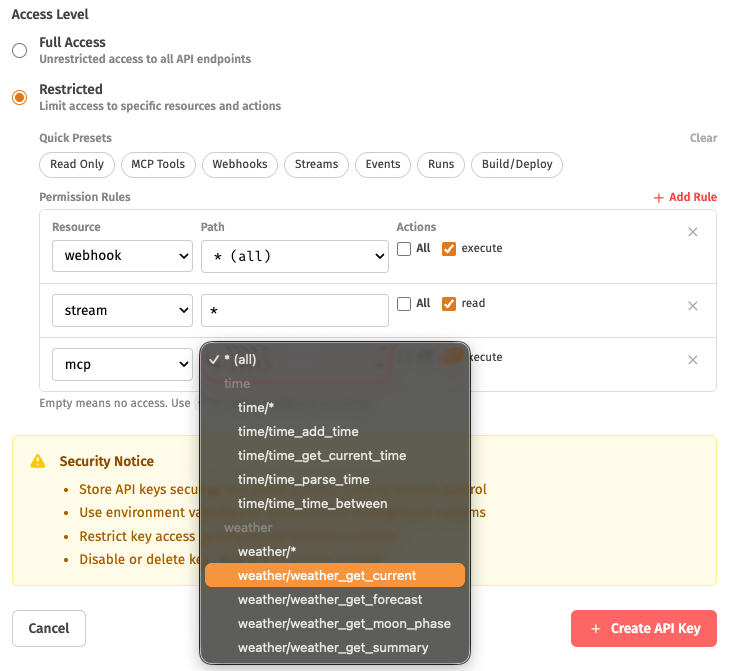
API keys, service keys, and sessions share a unified permissions model — a JSON map of resource URNs to action arrays:
{
  "mcp:weather": ["execute"],
  "webhook:internal/*": ["execute"],
  "stream:*": ["read"],
  "event:user:*": ["create", "read"]
}
Scope credentials to exactly what's needed — specific MCP tools, a single webhook service, read-only stream access. The Hot App includes an interactive permissions builder with quick presets so you don't have to write JSON by hand.
Sessions
Sessions are short-lived tokens (1h default, 24h max) for temporary, scoped access — ideal for browser clients:
{
  "permissions": {
    "stream:*": ["read"],
    "event:chat:*": ["create"]
  },
  "metadata": {"user_id": "end-user-123"},
  "expires_in": 3600
}
Permissions must be a subset of the parent API key — you can't escalate access. Available on Pro and Scale plans. See the Sessions API.
Subscribe with Event (SSE)
Subscribe with Event atomically subscribes to a stream and publishes an event in one request — eliminating the race condition where events are missed between subscribing and publishing.
curl -N -X POST 'https://api.hot.dev/v1/streams/subscribe-with-event' \
  -H "Authorization: Bearer $HOT_API_KEY" \
  -H "Content-Type: application/json" \
  -H "Accept: text/event-stream" \
  -d '{"event_type": "chat:message", "event_data": {"message": "Hello!"}}'
The response is a standard SSE stream: event:published, then run:start, stream:data, and run:stop as the handler executes. This is the recommended approach for streaming chat UIs and similar real-time features.
Platform Updates
Alerts
Alerts notify you when runs fail, deployments break, or anything you define goes wrong. Available on Pro and Scale plans.
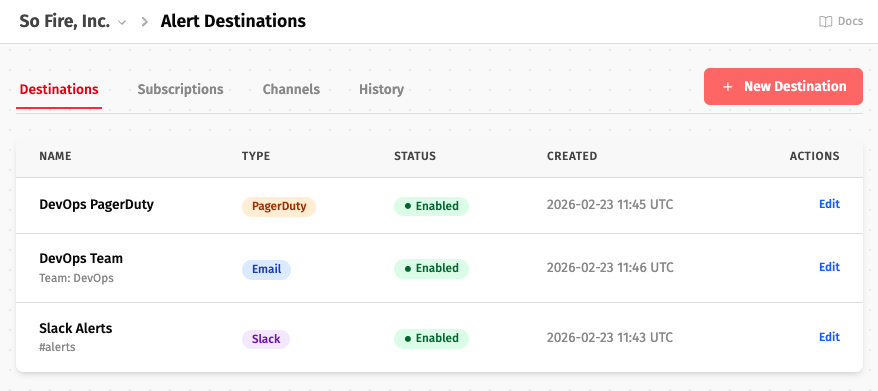
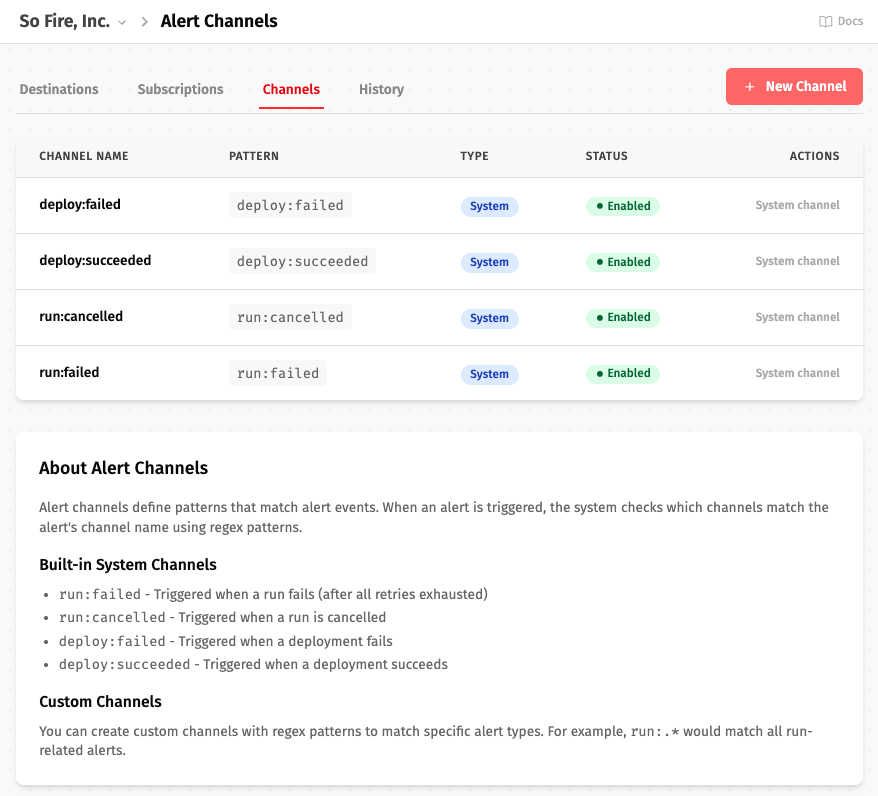
It's a pub/sub model: channels match event patterns, destinations define where alerts go (email, Slack, PagerDuty, webhook), and subscriptions connect them. Built-in channels cover run:failed, run:cancelled, deploy:failed, and deploy:succeeded. Create custom channels with regex patterns for your own alert types.
You can also fire alerts from code:
alert("payment:failed",{
  order_id: order-id,
  error: err-msg
})
Run Queue Wait
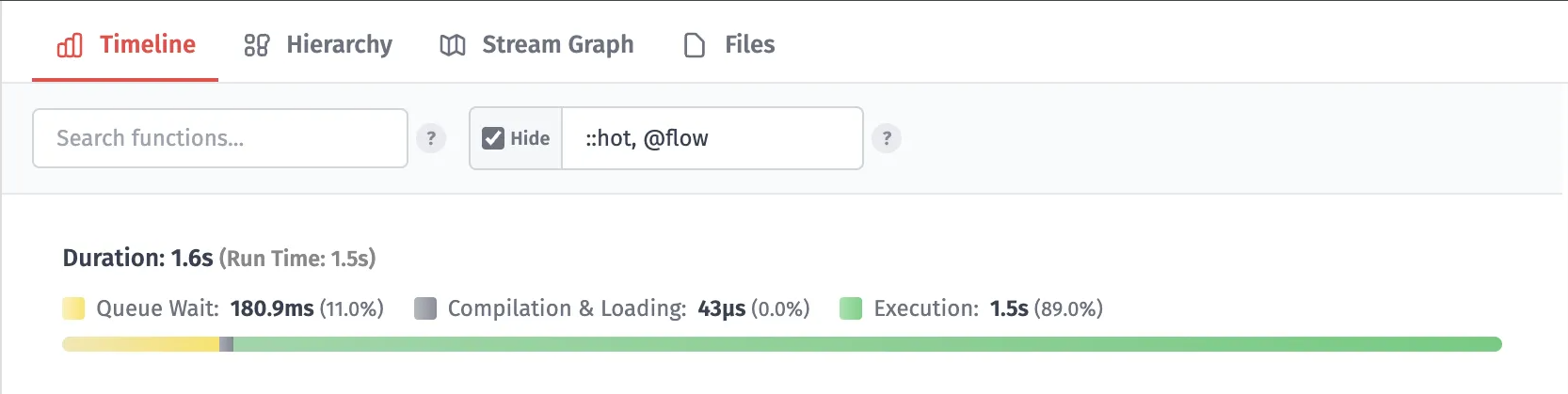
Queue Wait has been added to the Run Duration and has a segment on the Run Timeline for full transparency of your total runtime:
UI Improvements
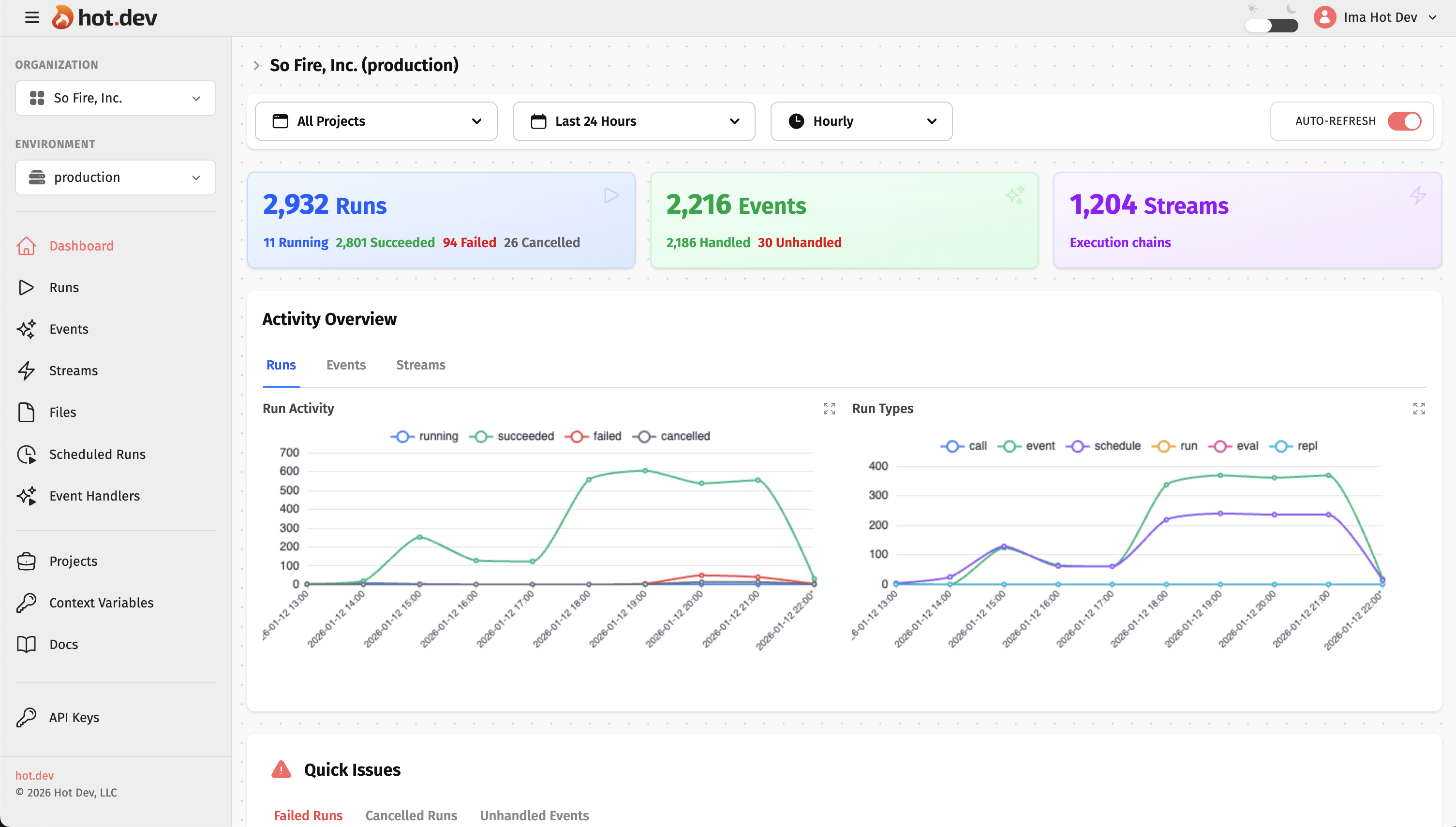
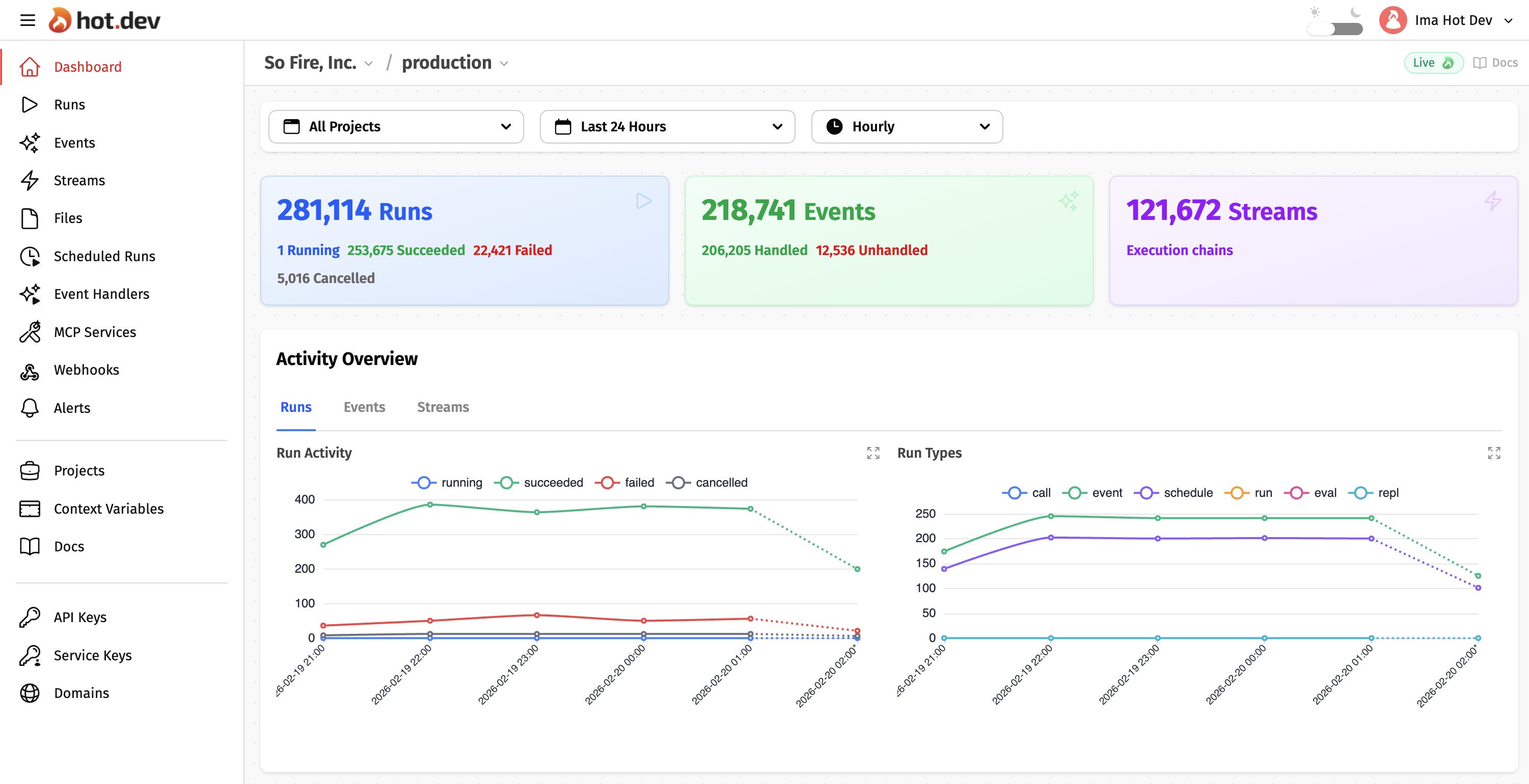
The Hot Dev App has several interface improvements:
- Moved Org and Env selectors into the breadcrumbs
- No more Auto-Refresh toggle - it's always
Live - Last graph segment indicates partial data with a dotted line
- Docs link on every page
- Background color changes improve contrast
BEFORE
AFTER
Standard Library
The Hot Standard Library gained two new namespaces:
::hot::uri — Parse, build, encode, and join URIs. Includes a Uri type with structured access to scheme, host, port, path, query, and fragment.
::uri/build({scheme: "https", host: "example.com", path: "/users", query: {active: true}})
// "https://example.com/users?active=true"

::uri/join("https://api.example.com", "users", "123")
// "https://api.example.com/users/123"
::hot::xml — Parse and build XML with from-xml, to-xml, child, children, text, attr, and path navigation via at.
xml from-xml("<root><user><name>Alice</name></user></root>")
text(at(xml, ["user", "name"]))  // "Alice"
New Packages
New additions to the Hot Packages registry:
| Package | Description |
|---|---|
| slack | Slack API — Chat, Channels, Users, Files, Apps, Webhooks (114 functions). See the AI Slack Bot tutorial. |
| mcp | MCP client for connecting to external MCP servers — tools, resources, prompts, SSE streaming |
| json-rpc | JSON-RPC 2.0 client for HTTP with request/response and SSE streaming |
| aws-bedrock | Foundation model inference — Claude, Titan, Llama, Mistral |
| aws-dynamodb | DynamoDB NoSQL operations |
| aws-lambda | Lambda function invocation |
| aws-s3 | S3 object storage, buckets, presigned URLs |
| aws-secrets-manager | Secrets Manager for secure storage |
| aws-ses | SES transactional and marketing email |
| aws-sns | SNS pub/sub messaging and notifications |
| aws-sqs | SQS message queue operations |
| aws-eventstream | Event Stream binary protocol for streaming services |
| aws-core | Shared AWS auth and utilities |
All packages include full API docs, types, and usage examples at hot.dev/pkg.
Get Started
Everything above is live now. Download Hot Dev to try locally, or sign up to deploy to the cloud.
Follow @hotdotdev on X or subscribe to Hot Takes for what's next.