


Building AI Agents with Hot Dev
Today we're publishing Hot Chat — a web chat demo, clonable in 15 minutes, that's a blueprint for integrating AI agents into your own products with Hot Dev. It ships two AI agents side by side: one whose memory follows the person across devices, one whose memory follows the channel across teammates. Switch between them live in the toolbar. The UI is a Next.js + TypeScript app that talks to Hot through our new @hot-dev/sdk.
Alongside Hot Chat, we're publishing hot.dev/hot-ai-agent 1.0.0 — a new Hot package of reusable harness primitives for AI agents: transports, commands, runtime stores, rendering, streaming, and MCP helpers. It sits on top of hot-ai and turns Hot's low-level AI building blocks into the application-level surface you actually build a product on. Hot Chat uses every part of it.
Try It
Before running the demo, install Hot if you don't already have the hot CLI.
git clone https://github.com/hot-dev/hot-demos
cd hot-demos/hot-chat
hot dev --open                  # terminal 1 — both agents
cp .env.example .env            # terminal 2 — the UI
# Hot App → API Keys → New Key; paste it into HOT_API_KEY.
# Then add your ANTHROPIC_API_KEY (https://console.anthropic.com/) to .env.
npm install && npm run dev
Open http://localhost:3000. The toolbar switches between the two agents live, no restart. Set ANTHROPIC_API_KEY in .env to get the real, streamed, memory-grounded replies the demo is built around — without it the UI still loads, but assistant replies fall back to a stub that just says the LLM is disabled. The harness sits on hot-ai, so you can wire a different provider in your own app.
The full walkthrough is at /docs/demos/hot-chat.
Two Agents, One Project
Hot Chat ships two agents in one Hot project. They look nearly identical on the surface — same chat UI, same slash commands, same streaming replies — but their memory works differently, which makes them useful for very different products.
Personal Mode is identity-first. Whatever you tell the agent follows you across sessions, tabs, and devices. Type /remember I prefer launch updates that start with blockers, close the tab, come back tomorrow on a different device, ask /recall — same notes. This is the pattern for assistants, journaling apps, per-user copilots, anything where memory belongs to the person, not the conversation.
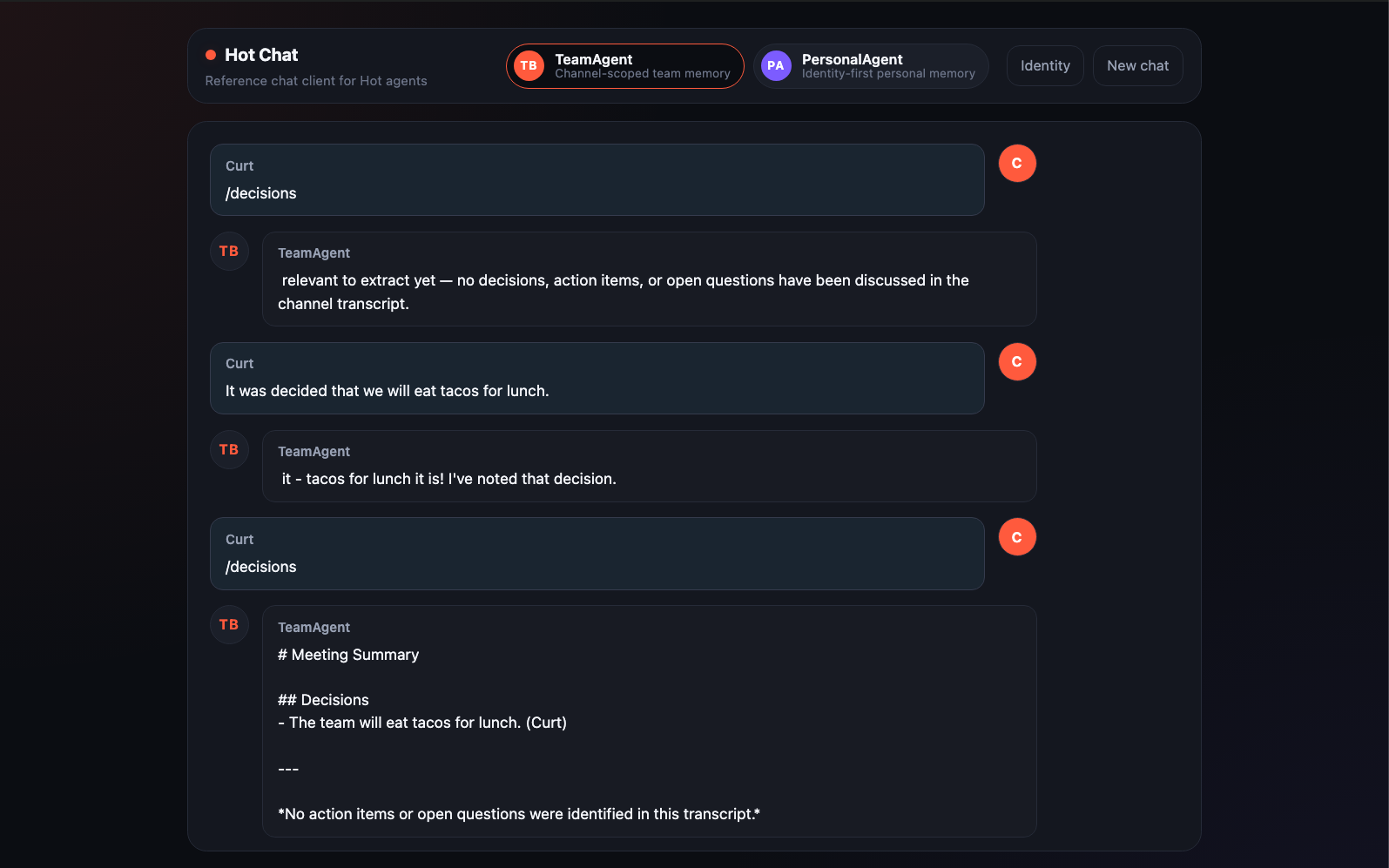
Team Mode is session-first. Memory is keyed to the channel, so two people chatting in the same room share one view, and two channels stay independent. Type "we decided to ship docs before launch", then "CI is the only blocker", then /ask what is blocking launch? — the reply cites the matching records with attribution. This is the pattern for team chat bots, support inboxes, shared workspaces.
The toolbar switch routes the next message to the other agent. Both agents share the same chat turn, the same streaming protocol, and the same UI; the meaningful difference is exactly the one their names imply — how each one keys its memory.
| Concept | Team Mode | Personal Mode |
|---|---|---|
| Session | the channel or thread | a scratch context per person |
| Identity | the person who posted | the durable memory owner |
| Memory | scoped to the session | scoped to the user |
Inside the UI
The Hot Chat UI is intentionally generic. It looks like a chat product, not a Hot demo. That's because the experience is the point:
- Quick-prompt chips — first time you load each mode, you get a column of suggested actions. Recall preferences, Daily brief, Decisions, Ask the team. They send a slash command immediately so you can poke at the agent without learning a syntax.
- Streaming replies — every assistant message renders as the agent generates it. Slash-command replies stream too, identically to LLM responses, so the UI doesn't have to know which is which.
- File attachments — drag a small
notes.mdor screenshot onto the chat. A chip appears below the composer; the next reply notes that an attachment was carried. The agent stores the file's name and type as metadata and could be extended to parse contents. - Identity panel — click Identity in the toolbar to see the exact
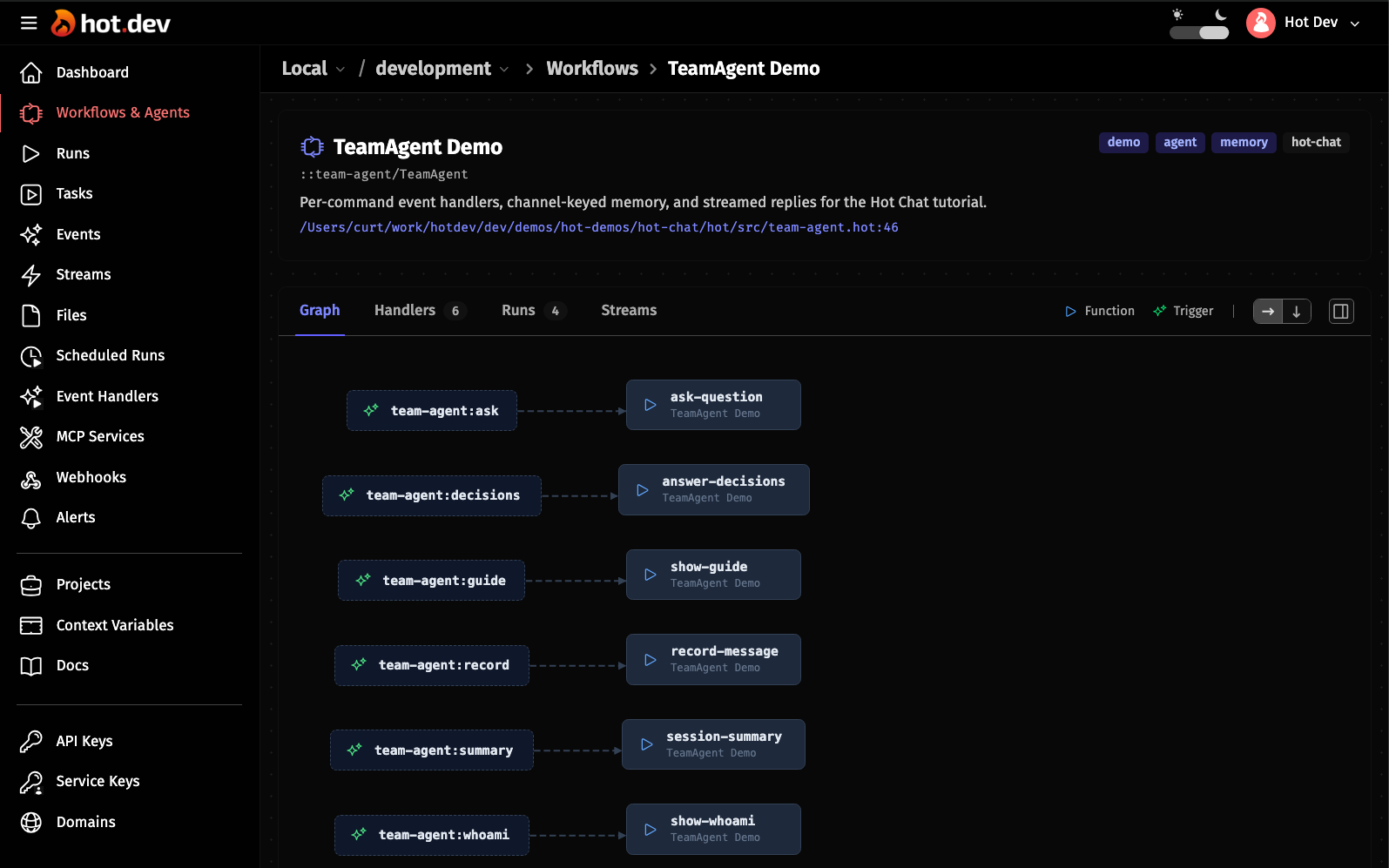
session_idanduser_idthe agent receives, in the same format a Slack or Telegram adapter would generate. Edit your display name; the next message picks it up. - Agent Graph — open the Hot Dev App and click into either agent's Graph tab. Every slash command is its own typed event handler, so you can see the structure of the agent without digging through a central dispatch function.
What hot-ai-agent Brings
If you've built an AI chat agent before, you've probably written some version of this stack: a slash-command parser, a way to thread the LLM call through retrieval-augmented memory, a streaming reply mechanism, per-agent stores for state and stats, per-request session/identity bindings so tools know who's talking. Most chat agents end up reinventing these.
hot-ai-agent extracts that layer. Concretely, it gives you:
- Typed transport messages — a single
IncomingMessageshape that adapters (web, Slack, Telegram, anything) translate into. The agent never branches on transport. - Slash-command parsing —
/ask@MyBot what's up?(the Telegram-style bot suffix that disambiguates which bot in a group is being addressed) becomes{name: "ask", arg: "what's up?"}, with the@MyBotstripped. No dispatch policy baked in. - The memory-grounded chat turn — the canonical "recall → persist user → bind request → stream → persist assistant" lifecycle in one function call. This one matters: getting the order wrong causes a subtle bug where the user's own fresh message contaminates their own retrieval (we call it RAG self-poisoning). The helper enforces the right order.
- Stable streaming events — every agent emits
<agent>:reply:start/:delta/:endevents at a stable, agent-scoped label so the client doesn't have to know which LLM provider is underneath. - Per-request session binding — when an LLM tool runs mid-turn, the resolved session and identity are bound to the current agent request. The model can't be tricked into writing to another user's memory by passing fake ids in the tool call.
- Per-agent stores and a session registry — every agent gets state, stats, errors, and a notification ledger. Scheduled jobs (daily digests, weekly summaries) iterate registered sessions and fan out per-session, with per-session error isolation.
- MCP plumbing — expose any of the agent's functions as an MCP tool with one annotation; Claude Desktop, Cursor, and other MCP clients can call into the agent directly.
What it deliberately doesn't include: transport vendor packages. No Slack, no Telegram, no Discord. Those live in the application and translate to the neutral types — keeps the harness portable and the dependency tree small.
Under the Hood, in One Snippet
When all the harness pieces are in place, an entire chat-style event handler in Hot looks like this:
remember-message
meta {
    agent: PersonalAgent,
    on-event: "personal-agent:remember",
}
fn (event) {
    d        event.data
    sender   identity-from-data(d)
    session  session-from-data(d, sender)
    input    base-input(d, session, sender, Str(or(d.text, "")))
    ::chat-turn/run-chat-turn(turn-cfg, input)
}
That's the whole handler. Resolve who's talking, package up the input, hand off to run-chat-turn. RAG, persistence, ordering, streaming, request binding, tool dispatch, error handling — all behind that one call.
Adding a new slash command in your own agent follows the same pattern: one more function, one more on-event annotation.
Get Started
- Run Hot Chat: /docs/demos/hot-chat — 15 minutes to a working chat with both agents
- Hot Chat source: github.com/hot-dev/hot-demos/tree/main/hot-chat
hot-ai-agentpackage: hot.dev/pkg/hot.dev/hot-ai-agenthot-aipackage: hot.dev/pkg/hot.dev/hot-ai@hot-dev/sdk(JS/TS): npmjs.com/package/@hot-dev/sdk- Production-grade agents: the full TeamAgent and PersonalAgent in the main Hot repo (
hot/hot/src/team-agent/,hot/hot/src/personal-agent/) carry the same pattern further —/forget,/why,/export, scheduled digests, and aResearcherpeer over the::ai::bus - Hot Dev on GitHub: github.com/hot-dev/hot — Apache 2.0
- Follow: @hotdotdev on X
Update: Since this blog was originally posted, Hot Chat has added support for OpenAI for both LLM replies and embeddings. That means you can use OpenAI embeddings instead of the default local embedder shown in the original video.